


What Is Ledger Live And How Does It Work?
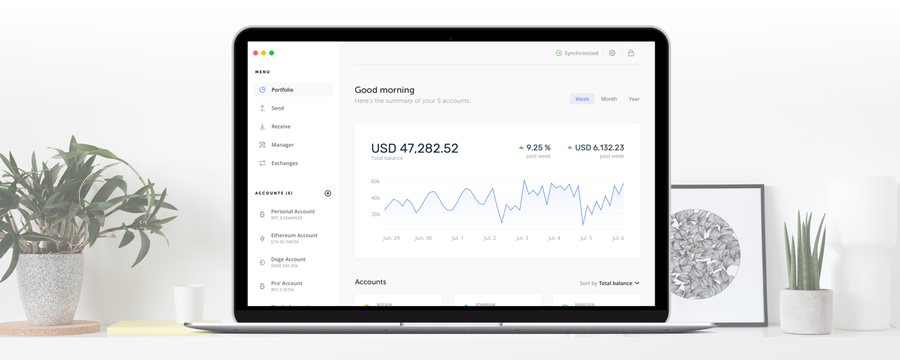
Ledger Live is a hardware wallet interface app for users of the Ledger Nano X, Ledger Nano S, and Ledger Blue.
The app enables Ledger users to manage their cryptocurrency hardware and assets. Additionally, it features real-time price updates, multi-account management, and the convenience of an extremely simple setup process.
Ledger Live combines the management of your individual crypto assets and device management into one interface, with the intention of gradually replacing the Chrome based applications system that previously annoyed some users of the device.
Additionally, with the Ledger live app, users can set up new Ledger devices and import existing accounts into the app quite conveniently. Ledger Live supports both the Ledger Nano S and the Ledger Nano X, and is available for free to all who use the devices.
Below is a run down of some of the exciting new features of Ledger Live.
Creating New Accounts
The app enables easy account creation by simply clicking the ‘+’ button from the dashboard and naming it. You can create multiple accounts for each crypto asset in case you decide to split your holdings (e.g. “New car bitcoin fund” and “Charity Foundation bitcoin fund”).
To change an account’s name, you simply open the account and click the wrench icon at the top right-hand side.
However, you’ll need to switch between different apps for some of the cryptocurrencies (i.e. you still have to use third-party applications).
Importing Existing Accounts
If you had previously used chrome apps to set up a currency wallet on your Ledger hardware, you can easily change your device management to Ledger Live.
During setup, you’ll be prompted to select the cryptocurrency from a drop-down menu, then open the relevant app on your device.
Additionally, you can import an existing account by simply clicking the ‘+’ button next to ‘Accounts’ on the left-hand side menu.
Join the 10,000+ crypto investors & enthusiasts and get 10% off your first order.
Secure and Intuitive Transactions
To ensure that money is coming and going to the correct recipient and sender, Ledger Live provides transactions confirmations and on-screen guidance that enhance the accuracy of this critical process.
The firm has completely re-engineered the transactions system to come up, with a step-by-step way to send and receive cryptocurrency assets.
The application even offers new options for advanced users who seek more granular control over their transactions and asset accounts.
Real-Time Balance
For those who love to compulsively check their portfolio value throughout the day, Ledger Live now allows you to check the value of your assets based on real-time market rates!
The details of of your combined holdings as well as a convenient price chart can be views at the top of the ‘Portfolio’ screen. Transactions and balances are also available in case your Ledger device is disconnected.
Fiat Currency Rates
The app enables users to choose from a wide range of fiat currencies (23 at launch) and rate providers (18 at launch).
To switch your fiat currency or provider, simply click the ‘settings’ icon and choose your preference using the ‘Rate provider’ and ‘Counter value” menus. These settings are also used when sending or receiving money.
Ledger Live is an excellent new and free product for Ledger users that only adds to the security, usability, and convenience of using Ledger devices. The features contained in the application only reinforce the fact that the Ledger hardware wallet is a must have for any serious cryptocurrency investor or enthusiast.
JOIN NOW AND GET 10% OFF YOUR FIRST ORDER
Join the 10,000+ crypto investors & enthusiasts who receive exclusive discounts, crypto investing and security guides, digital privacy protection tips and more every week.